
Crash reports #
When Carvio closes unexpectedly, it keeps a short report of what went wrong. The next time it starts, it asks whether to send that report to carviocnc.com. Reports show which errors happen and on which computers, so they can be fixed first. Nothing is sent until you choose Send report.
A report holds the error, Carvio's version, your system and graphics, the last things you clicked in Carvio, and some counts about the open job: how many sheets, vectors and toolpaths it had, which view and form were open, the units and the app scale. It never holds your projects or your drawings. Carvio takes the names of people, computers, files and folders, and any email address, out of the report before it is shown or saved. Tick Show the report to read exactly what goes.
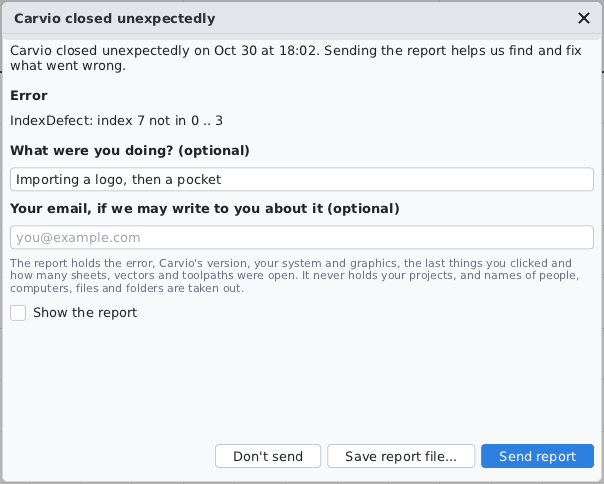
Carvio closed unexpectedly #
This window opens when Carvio starts after it closed unexpectedly. It opens after the licence agreement and after Carvio asks about recovering your unsaved work (see Autosave). If Carvio closed more than once, it offers each report in turn, newest first.
What were you doing? #
Optional. A few words about what you were doing when Carvio closed, for example "calculating a pocket on an imported SVG". It is often the quickest way to find the cause. These words are sent with the report and kept private.
Your email #
Optional. An address where we may write to you about this report, for example to ask for the file that caused it. Leave it empty to stay anonymous. It is kept encrypted and used only for this report.
Show the report #
Shows the exact text of the report, as it will be sent or saved.
Send report #
Sends the report to carviocnc.com. When it arrives, the window shows its reference, which you can quote if you write to us about it. If Carvio can't reach the site, for example because the computer is offline or a company network blocks it, the window says so. You can then click Try again, or save the report as a file.
Save report file... #
Saves the report as a .carviocrash file. Upload it from any device with an internet connection
at carviocnc.com/bug-report. The file is plain text, so you
can open it in a text editor to see what it holds.
Don't send #
Deletes the report without sending it. Carvio does not ask about it again.
Carvio hit an error #
Sometimes Carvio can recover from an error without closing. When that happens, the same window opens straight away, titled Carvio hit an error, and you can send or save the report in the same way.
What you were doing when the error happened may be half finished, for example a toolpath only partly made or a change only partly applied. Save a copy of the project under a new name, check the copy, and carry on from it. This leaves your original file as it was.
If the same error happens again soon after, Carvio closes the form that was open. If errors keep happening, Carvio closes, and offers to send the report the next time it starts.
Save a copy... #
Saves the project under a new name (Save As...), so your original file stays as it was.
Turning the question off #
Untick Offer to send a report after Carvio closes unexpectedly in Preferences > General and Carvio stops asking. Reports it keeps are then deleted at the next start, without being sent. See Crash reports in Preferences.